


We wanted to know how early you can spot a phishing domain. So we started watching every new domain name that shows up each day, and taught a system to read them.
It started with a pretty simple question
If you've ever sat through a phishing incident review, you'll know the moment. Someone pulls up the domain the attacker used, and it's something like a slightly-off version of a login page, or a delivery firm with an extra word bolted on. And the obvious question is: when did that thing actually appear, and could we have seen it coming?
That's really where this whole project came from. We kept asking ourselves where the earliest signal is that a domain is going to be used for phishing. We wanted to see it right at the start, well before it lands in an inbox, gets reported, or turns up on a blocklist three days later. Because here's the thing about phishing infrastructure: before anyone can click on it, somebody has to build it. They buy a domain, it gets added to the registry, it gets pointed at some nameservers, probably picks up a certificate, gets some hosting and a page. Every one of those steps leaves a trace, and some of those traces are public.
The first idea everyone has (us included) is 'just download the list of new domains and grep it for suspicious words'. We tried that. It's honestly the least interesting version of the problem. You get a firehose of 'secure', 'login' and 'verify', mostly attached to perfectly boring businesses, and the actually nasty stuff often doesn't contain an obvious word at all. The real job is taking well over three hundred thousand new names a day and working out which changes are genuinely unusual, which ones belong together, what they look like they're for, whether there's any evidence they're harmful, and whether any of it matters to you. And doing all that without quietly sliding from 'this is weird' to 'this is malicious', which is the easiest mistake in the book.
So we built something for ourselves: an internal research tool so our own team could watch the domain ecosystem every morning and see the trends (what's being imitated, which lures are rising, which operators are suddenly busy). It works more like an observation system than a list of bad domains. It writes down what changed first, and only then asks whether the change is interesting. That ordering ended up mattering more than almost anything else, and you'll see it come up again and again below.
Starting with the registry's phone book
Everything starts with data. Every domain ending (.com, .net, .shop, .online, .app, .xyz and friends) is run by a registry, and each registry keeps what's effectively a phone book: every domain currently live under that ending, and the nameservers it points at. We take a fresh copy of those phone books every morning. On the day these figures come from that was 1,041 TLDs and roughly 257 million names. .com is in a league of its own: 167 million names, more than every other TLD we monitor put together. The interesting bit isn't the phone book itself, it's what changes between one morning and the next.
We're a bit fussy about wording here, and for good reason. If a name is in today's zone and wasn't in yesterday's, all we actually know is that we saw it turn up between two snapshots. That doesn't mean someone registered it yesterday. It might be brand new, sure, but it might also have been bought months ago and only just switched on, or it's coming back after a gap, or it's going through a registrar's renewal process. So we record 'first seen', 'removed from zone' and 'reappeared', and never pretend every addition is a registration. This sounds pedantic, but on our very first day it stopped us publishing something that just wasn't true (more on that later).
Before any of the clever stuff, we had to answer a really unglamorous question: is today's data actually any good? A broken registry export can look amazing. If a zone that normally has half a million names turns up with 350,000, a naive diff will cheerfully tell you 150,000 domains vanished overnight. Huge story! Right up until you realise the registry sent half a file. So checking the source is part of the intelligence, not an afterthought. Every zone gets checked for whether it arrived, whether it's complete, whether it parsed, whether its size moved by a believable amount, and whether our counts reconcile exactly with the source. If a zone fails, we'd rather lose it for a day than let it pollute everything else. On day one that's exactly what happened: a couple of registries sent files that had changed but whose contents hadn't, and a couple more looked like partial exports. They were all held back. That matters even more over time, because bad data also teaches your baseline that bad data is normal.
What's under the hood
The system is split into two halves that only share data, never code. That's how we build most of the platform, and it keeps each bit easy to test and replace.
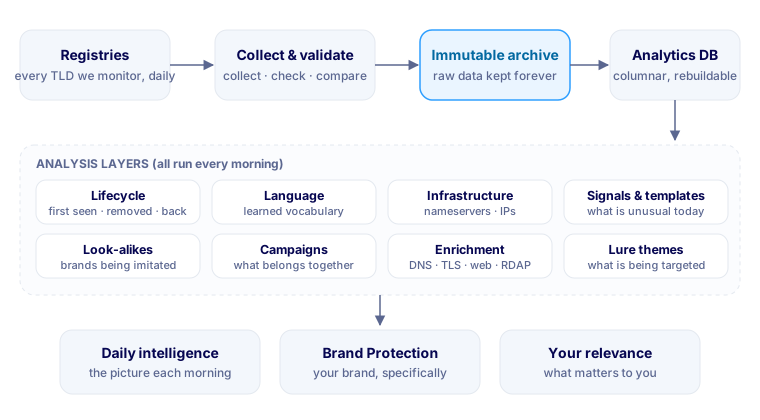
The collection side does three things every morning: it gets the day's data in, makes sure it's complete and trustworthy, and works out exactly what changed since yesterday. It has to cope with zones from a few dozen names to the hundred-and-sixty-odd million in .com, and anything that fails its checks never makes it any further. What does pass goes into an archive that we only ever add to. Nothing in there ever gets changed or deleted, and that's deliberate. Our tokeniser will get better, our clustering will get better, and six months from now the interesting question might be one we haven't thought of yet. If we only kept yesterday's conclusions we'd lose all that history, but because we keep the raw observations we can replay any of it.
The analysis runs on a columnar database that's brilliant at exactly this sort of thing: enormous tables of simple rows and questions like 'how often does this string appear across over 250 million names?'. It reads the compressed archive files directly, so loading a day is quick and the archive stays the only copy of the raw data.
| Layer | What lives there | Why |
|---|---|---|
| Archive | Raw daily data, additions and removals, all compressed | The permanent record; everything below it can be rebuilt |
| Analytics DB | Domains and their lifecycle, name features, nameserver data, signals, clusters, campaigns, enrichment | Fast analytics across hundreds of millions of rows, partitioned by day |
| Reports | The daily summary, campaign files, blocklists and API-shaped JSON | What analysts and the platform actually read |
| Platform database | The finished intelligence objects customers interact with | Small, curated and access-controlled per organisation |
The analysis itself is a chain of stages, each with one job and its own tables. Any stage can be re-run for any day and will give exactly the same answer, every run is logged with its code version, timings and row counts, and the huge working tables (the daily nameserver table is over 600 million rows) can always be regenerated from the archive. While building this we rebuilt the whole analytics database from empty several times, and every count reconciled with the source files every time. If you take one engineering lesson from this post, make it that one: be able to rebuild everything from the raw data. (When .com arrived the dataset roughly tripled overnight, and a handful of steps that had quietly been holding everything in memory had to be rewritten to stream through it instead. The answers didn't change; the runs just stopped falling over.)
Teaching a computer to read domain names
This is the bit I find most fun. A domain name carries a surprising amount of meaning. Show a person docusignenvelope-review24 and they instantly read 'DocuSign', 'envelope', 'review' and a number. To a computer it's just one string of characters. So the first real job is teaching the system to read names the way we do.
Hyphens and digits are the easy part; they're natural break points. The hard part is joined-up words, and that's where most of the interesting names live. Our first instinct was a dictionary, and it fell over almost immediately. Dictionaries don't know brand names, product names, slang, deliberate misspellings or most languages that aren't English, and domain names are absolutely full of all of those. 'docusign' isn't in any dictionary. Neither is 'microsoft365', or half the crypto wallets on the internet.
So we let the zones teach it instead. With more than 250 million existing names to learn from, the system built its own vocabulary of over half a million word units, brands and slang included, and uses it to split joined-up names into words. It isn't perfect, and some names are genuinely ambiguous: is nowhere 'now here' or 'no where'? But it's good enough to turn a blob of letters into words you can count, compare and reason about, and crucially it learns new brands and slang without anyone updating a list.
Once names are split into words, each one is described by a set of structural and language features. And the important decision we made early on was that discovery doesn't depend on a list of suspicious words at all. The first layers never ask 'is this suspicious?'. They ask 'is this unusual?', which is something you can actually measure: how many did we see, how many would we expect, is it more common than in the existing zones, is it completely new, is it concentrated on one TLD or one set of nameservers?
The endings have personalities, too. New .com names are longer than everything else's (12.4 characters against 10.6), about twice as likely to contain a hyphen (10% against 5%), less likely to contain digits and less random-looking. The cheap newer endings are where the counters and machine-made strings live; .com is still where people go when they want a name that reads like words.
That's how it spots things nobody told it to look for. On day one, for example, one made-up five-letter label turned up under 48 different TLDs at once, and nothing like it existed in the zones before. Another day-one pattern produced a hundred random-looking names on one TLD where no existing name fitted the shape at all. They're brilliant discovery signals, and deciding whether any of them is a threat takes more evidence.
Which brings us to my favourite trick: patterns. People create names, but software creates patterns. When somebody registers domains in bulk they're using a generator, and generators leave fingerprints. If you swap the bits of a name that vary (counters, random strings, words pulled from a list, the TLD) for placeholders, hundreds of names collapse into a single template. Here's what that looks like, with made-up examples:
| Names like... | Collapse to | What varies |
|---|---|---|
fastparcel-1041, fastparcel-1042, fastparcel-1043 ... | fastparcel-{NUM} | a counter |
k3xq9ztl, p0w8mfaa, zr7ty2qe ... | {RAND} | random strings, one per name |
securedocs-invoice, securedocs-receipt, securedocs-statement ... | securedocs-{TOKEN} | words pulled from a list |
mybrandname under .shop, .store, .online, .site ... | mybrandname.{TLD} | one label, lots of endings |
Once you've got a template, it becomes a thing in its own right. How many members does it have? Has it ever existed before? Does the counter run in order? Which endings does it use? Does it keep going tomorrow? With a bit of history you stop looking at individual domains and start watching the behaviour of the thing generating them, which is a lot closer to what threat intelligence is actually about.
What people are dressing domains up as
Discovery is great for finding the unexpected. But a lot of the time we do know what we're looking for: people pretending to be someone else. So on top of the unsupervised stuff, every new name goes through two more lenses.
The first is look-alikes. Every name is compared against a big list of well-known organisations, looking for four tricks. DocuSign is a nice example to walk through, because e-signing lures are everywhere at the moment and people are trained to click 'review document' without thinking twice. The table shows all four, plus a name with no brand at all that only the second lens (below) will catch:
| Illustrative name | Trick | Why it works on people |
|---|---|---|
docusign-envelope-review.<tld> | Brand + lure words | The brand, plus words lifted straight from a real signing email |
docusiqn.<tld> | Typo | One letter swapped (g for q). Easy to miss in a small font |
com-docusign-secure.<tld> | Prefix trick | Starts with 'com-', so a quick glance reads it as part of docusign.com |
dоcusign.<tld> | Look-alike characters | The 'o' is Cyrillic. It looks identical, but it is a completely different name |
secure-esign-portal.<tld> | Theme, no brand | No brand at all, but squarely in the documents and e-signature theme |
microsoft365-signin-verify.<tld> | Brand + lure words | The classic account-login combination |
Finding look-alikes is honestly the easy bit. Ranking them is where the work goes, because loads of innocent names contain a brand by coincidence, and plenty of genuine look-alikes imitate piracy or gambling sites that a corporate security team will never act on. So the ranking pushes login, payment, government and delivery brands to the top, and leans on what enrichment finds (does it resolve, does it redirect to the real brand, is there a fresh certificate, does the page ask for a password) before calling anything high-risk.
So who's actually being imitated? Honestly, not who I expected. Over our first week the single biggest burst targeted a parcel company. Ninety high-risk look-alikes of DPD arrived as one series, in one ending over two days, every one built from the brand, a long German phrase for a parcel depot, and a counter. That's the textbook set-up for a wave of 'we couldn't deliver your parcel' texts aimed at one country. The steadier targets look completely different: Ledger, Google, Apple, iCloud and Microsoft look-alikes turned up on most days of the week, spread across a dozen or more endings in a steady drip. Both patterns matter, and they call for different responses: a burst is something to block as a batch, a drip is something to watch for.
The very first day had its own surprise: the most-imitated name was a game piracy site, with 28 high-risk typo domains all on their own, and gambling brands filled a lot of the rest. Those sites have huge, loyal audiences who go looking for them by name, and fake piracy sites have been a favourite way of handing out malware for years. It's also why ranking matters so much, because a SOC isn't going to act on a fake piracy mirror.
Strip that out and look at the brands a business would actually care about, and a pretty clear picture appears:
Sign-in is still king. Google, Apple / iCloud and Microsoft look-alikes are almost always the login-page kind, and between them they were the most persistent targets of the week. Then there's a really interesting spread: crypto wallets and exchanges (Ledger, Binance, Coinbase, Trust Wallet), payments (Chase, PayPal), the messaging and social apps people use to log in elsewhere (Facebook, WhatsApp), video calls (Zoom), and second-hand marketplaces like Kleinanzeigen and Vinted, which lines up with the classic 'I'll pay you through this link' scam aimed at people selling things online. None of these are the brands of the companies being attacked. They're the platforms those companies' staff and customers use every day, and that's the bit I'd want every security team to take away.
The second lens is lure themes, and this is the one that answers 'what are people actually targeting?'. We sorted the language of lures into 29 themes: account and login; payments and banking; parcels and delivery; documents and e-signature; tax and government; tolls, parking and vehicles; crypto and web3; software downloads; tech support; HR, payroll and jobs; and so on. Behind them is a vocabulary of several thousand terms.
The rules for when a theme actually sticks matter more than the word lists. One generic word isn't enough: secure on its own tells you nothing, and neither does online. It takes specific or corroborating language before a theme sticks. So secure-login lands in account and login, parcel-tracking-update lands in parcels and delivery, and docusign-envelope-review lands squarely in documents and e-signature. And because the splitter has already broken joined-up names into words, the themes work just as well on docusignenvelopereview as on the hyphenated version. That's a big deal, because attackers know hyphens look dodgy.
Here's the bit that genuinely surprised me. On 5 October, 17,191 of the 544,970 new names (about 3.2%) fell into at least one theme, and for 23 of the 29 themes, the themed share of brand-new names was actually lower than across the existing zones. Payments, crypto, tax, logins: all less common in fresh names than in the old ones. The existing zones are full of years of parked, abandoned and opportunistic lure-ish names, so new domains look comparatively tame. Only six came out at or above normal that day: AI tools; tolls, parking and vehicles; parcels and delivery; piracy; gaming; and documents and e-signature.
That tells you two useful things. First, a scary word in a domain name really is a weak signal on its own, which is exactly why we don't treat themes as verdicts. Second, the value of themes is as a change detector. There are always payment-themed domains, so the interesting moment is when a theme suddenly moves. On our first two days, the tolls, parking and vehicles theme went from 9 names to 32, and from about 1.3× normal to about 3.4×. By 5 October it was back to about 1.3× (40 names, with .com now in the mix), which is exactly why two days is nowhere near a trend. But a jump like that is the kind of movement the system is built to flag, and toll-payment texts are a lure plenty of people will recognise. Themes also give you a different way in. A name with no brand at all, like secure-esign-portal, never shows up as a look-alike, but it still lands in documents and e-signature, and it still gets looked at if it shares infrastructure with things that do.
Infrastructure gives the game away
Words are useful, but attackers can change a name for next to nothing. Infrastructure is harder to fake. Alongside every domain we also see its nameservers, and for many of them the IP addresses behind them. That's over 600 million records a day, and it's free intelligence: we learn a lot about a domain without sending it a single packet. For every nameserver we know how big it normally is, so we know roughly how many new domains it ought to pick up on an ordinary day, and we look for the ones taking on way more than their size explains. That stops the giant providers looking suspicious just for being giant, and it surfaces the small operators that suddenly aren't behaving normally. In .com, most new names land exactly where you'd expect, on Cloudflare and the big registrars' default nameservers, which is why lift is measured against each operator's own size rather than raw counts.
A jump like that earns a closer look. Watching infrastructure also catches things the word-based stuff simply can't, because a campaign can be built entirely from random names with no brand and no lure word and still give itself away by appearing all at once on related infrastructure. On day one it found a single address behind 28 small 'vanity' nameservers across four TLDs, each far too small to notice on its own. (A random aside we didn't expect: on our first day 8.6% of new domains were DNSSEC-signed against 5.4% of the existing zones, almost entirely because a few registrars now sign by default. You only notice that sort of thing when you look at everything.)
Put the word-level and infrastructure relationships together (templates, words, nameservers, IPs, hosting, certificates, page fingerprints, timing) and you end up with a graph. There's a trap in it, though. Cloudflare hosts an enormous number of unrelated domains, registrar defaults put total strangers on identical nameservers, and parking providers make thousands of unrelated pages look the same. Sharing something isn't the same as sharing an owner. So we're strict about evidence versus context: a specific naming template plus an odd concentration on one small nameserver is evidence. 'They're both on Cloudflare' is context, it gets written down as context, and it never counts.
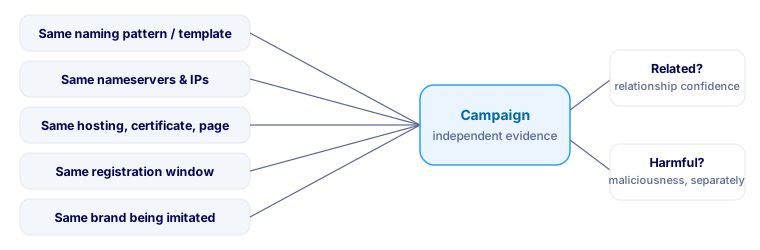
That's probably the most important design decision in the whole thing. We don't have one confidence score, we have two. Are these domains related? And, completely separately, is there any evidence the activity is harmful? A group only becomes a campaign when independent kinds of evidence agree it's related, and maliciousness is judged on its own. A bulk SEO operation can quite rightly be 'related: high, malicious: unknown'. Coordination is evidence of coordination, and nothing more.
Easier to show than describe, so here's one day-one cluster (the actual names don't matter, so I've left them out). Overnight, about a thousand names appeared in .shop. On its own, meh: .shop gains thousands a day. But the naming pattern, the infrastructure and the registration timing all pointed the same way: one word and a counter, numbered in order, on infrastructure that had suddenly got very busy, all bought at almost the same moment. They shared a TLS certificate too, but it turned out to be the hosting company's default one, so it was recorded as context only. Result: we're completely sure it's one operation, and we've got no evidence at all that it's harmful. It looks like bulk SEO or link spam, and that's exactly what it says.
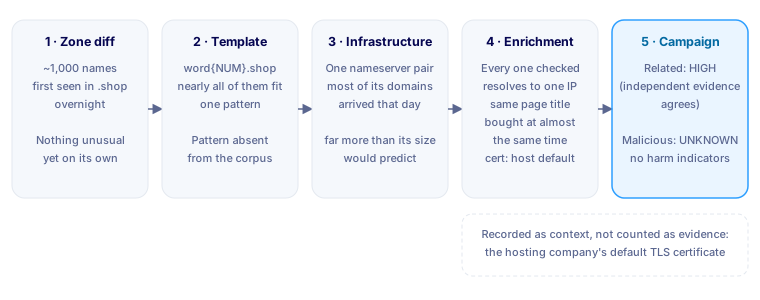
Campaigns need a memory too. Tomorrow's cluster shouldn't become a brand-new campaign if it's obviously the same operation, so when a new cluster overlaps an existing campaign on template, infrastructure, certificate or wording, it joins that campaign instead. An operation that runs for weeks then shows up as one growing story rather than a fresh alert every morning. (We saw this work on day two: the same counter-style series came back with over a thousand more names and was picked up as the same campaign.)
Only checking what matters, and letting the evidence change our mind
With three hundred thousand new domains a day it's tempting to poke every single one: resolve it, fetch the website, grab the certificate. We deliberately don't. Almost all of them are irrelevant, and doing it would generate a mountain of pointless traffic and mostly teach us that ordinary websites are ordinary. Instead the cheap analytical layers run across everything, and only a shortlist gets a closer look, with a light, polite check of how and where it's hosted. On 5 October, about 70% of the shortlist resolved, and two-thirds of the certificates we saw came from a free, automated certificate authority.
What I like most is that enrichment can just as easily make things less interesting, and the first week had good examples in both directions.
The 2,800 'new' names that were a year old
Our first version of the ranking put a huge series of two-words-around-a-fixed-middle-word names right at the top of the day. The stats said wildly unusual, the clustering said almost certainly related, and it looked like textbook bulk registration. Then the registration data came back: every name we checked had been bought a year earlier. They were just re-entering the zone during a registrar's renewal cycle, and loads were showing an 'expired domain' page. The anomaly was real; our first guess at the cause wasn't. They now go into their own registrar-lifecycle section at the bottom of the report. Good threat intelligence should be able to talk itself out of an exciting conclusion, and this was the system doing exactly that.
Thirty fake software download sites
Here it went the other way. Buried in a much bigger, messier nameserver group was a tight set of 30 names: a short fixed prefix stuck onto the names of well-known freeware download portals. Same network block, a shared certificate with no identifying details, and every one returned 403 Forbidden when we checked, which is what you'd expect from cloaking (only showing the real content to the visitors it wants). That's a classic set-up for SEO poisoning, where people searching for free software end up downloading malware, so it's rated medium and sits near the top of the day.
A parcel scam, built and waiting
This is the DPD series from earlier, and enrichment is what made it interesting. On 2 October sixty names appeared in one cheap ending, each made from 'dpd', a German phrase about a parcel transfer centre, and a number. The next day sixty more arrived in the same ending with a different German phrase, meaning 'shipment distribution centre'. Nearly all of the ones we checked already pointed at the same large cloud provider, yet none of them was serving anything: the first batch didn't answer at all and the second only returned 'not found'. Someone had built the infrastructure and parked it, ready for the 'we couldn't deliver your parcel' texts. This is exactly the moment the whole project is aimed at: 120 names (90 of them already rated high-risk) that you could block before the first message goes out.
A German PayPal login page
Three names in .net, each built around 'pay-pal' and the sort of words you'd find in a payment email. Two of them resolved, both had certificates issued in the previous few days, and one was serving a page titled 'Einloggen', German for 'log in'. Put that next to the DPD series and the first week had a distinctly German flavour, a good reminder that a lot of phishing targets a whole country's population at once.
Tech support, open for business
Five names across .store, .help and .shop, each pairing 'mcafee' with 'support'. All five resolved to the same big cloud provider, all five had brand-new certificates, and all five were serving a page when we checked. Fake antivirus support is an old scam aimed at people who aren't very technical: a pop-up warns that the computer is infected and gives a number to ring. The names fit that pattern exactly.
What we actually use it for
All of that is lovely, but the obvious question is: so what? Here's how our own team uses it day to day.
Seeing impersonation while it's still being built. The best-case outcome is spotting a look-alike of a brand you care about (yours, or a platform you depend on) the morning it appears, before the email campaign goes out. A typical phishing domain sits around for hours or days between being set up and being used. If you see it on day zero, you've got options: block it, warn people, start the takedown, or just watch it.
Giving every domain an age and a backstory. When an analyst is looking at a suspicious link, 'this domain first appeared in its zone 31 hours ago, alongside 40 siblings on the same nameserver' is a very different conversation from 'unknown domain'. That first-seen date and the siblings are now just there to look up.
Hunting backwards. Because we keep everything, when an incident does happen we can ask: when did this domain first show up, what else appeared on the same nameserver that night, and does anything else match the same template? That often turns one known-bad domain into a list of its unused siblings, which you can block before they're ever sent to anyone.
Watching the trends. This is the bit we check most. Themes and look-alikes let us say things like 'e-signing lures are up this week', 'parking-fine names spiked overnight' or 'Microsoft sign-in look-alikes are mostly landing on two TLDs right now', usually well before the matching emails start doing the rounds. It's become a really good early read on what attackers are setting up.
Measuring our own head start. We call it Precursor First Seen. It's simply the date that infrastructure entered our dataset, which is a far more defensible thing to say than that we were the first company on Earth to notice it. Line that up against when a domain later appears in public phishing feeds and you get a genuinely interesting number: how much earlier registry data can spot infrastructure than conventional threat intel. I can't wait to have enough history to answer that properly.
And the nice thing is it gets better just by running. Every day adds another three hundred thousand or so observations, more history for every word, template, nameserver and campaign, and better history means better baselines, which means better anomalies, which means better campaigns. In a year's time the most valuable thing here will be the dataset.
What you can take from this, whoever you are
Ask how old the last malicious domain you blocked actually was. When we look back at phishing and malware infrastructure, a striking amount of it is days old, sometimes hours, when it's first used. That makes domain age one of the cheapest and most underused signals a defender has. Most email gateways, web proxies and DNS filters can treat very young domains differently (extra scrutiny, a warning banner, or a straight block for the first few days), and the false-positive cost is usually lower than people expect, because real businesses rarely email you from a domain they bought yesterday.
Be suspicious of your own excitement. Almost every mistake we nearly made had the same shape: something looked dramatic, and the dramatic explanation was wrong. A spike in removals was a broken export. A huge 'new' campaign was a year-old renewal cycle. A shared certificate was just the host's default. Ask that of any alert, feed or report you consume (ours included): does it separate 'unusual' from 'malicious', and does it show you the evidence or just a score?
Your attack surface includes things you don't own. The look-alikes we see every morning imitate login pages, delivery firms, tax authorities, e-signing tools and crypto wallets far more often than any individual company, because attackers go where the users are. So the platforms you rely on are as much an impersonation target as your own brand. Know which ones those are (your public DNS gives away a surprising amount), make sure people know what the genuine DocuSign or Microsoft sign-in flow actually looks like (a phishing simulation programme can test that), and use phishing-resistant sign-in wherever you can, so a convincing look-alike has less to steal.
Do the boring hygiene. A strict DMARC policy so nobody can send mail as your exact domain. Register the obvious typos and brand-plus-keyword variants of your main domains before someone else does. Keep an eye on certificate transparency for your brand, because a certificate for a look-alike is often the first public sign it's about to go live.
And one question to sit with: if the infrastructure for an attack on your organisation was set up this morning, who would notice, and how long would it take them? For most organisations the honest answer is 'nobody, until it's used'. That's the gap this whole thing exists to close.
Where it stands
A week in, this is roughly what the system is working with each morning. These numbers are as of 5 October 2026, after seven days of comparisons starting on 29 September, and nearly all of them grow every day.
The part I find most telling is the ratio between the top and bottom of that list. Hundreds of millions of names and over half a billion nameserver records go in every day, and what comes out is a few hundred look-alikes and a few dozen new campaigns worth a human's time. Most of the engineering is in that funnel.
What's next, and what we won't do
The first feeds show the approach works, and there's a lot still to build. Time is the big one: seven-day baselines to separate one-off bursts from repeated behaviour, thirty days for a real sense of normal, ninety for seasonal patterns, with Mondays compared against Mondays. Campaigns need to persist properly, merge when later evidence connects them and resurface when dormant infrastructure comes back. Themes get far more useful with history too, so instead of '83 payment-themed domains today' we can say payment-themed activity is well above its usual level and driven mostly by refund terminology, or track how the lures around Microsoft, DocuSign, HMRC or the parcel firms shift over the year. Certificate transparency will give us much finer timing than a daily snapshot, and it's already letting us start to see the country-code domains we can't otherwise reach. The coverage keeps growing as more registries approve our access, and correlation with public phishing feeds will let us measure that head start properly.
There are also a few things we've decided we won't do. We won't call every odd domain malicious, or claim every newly observed domain was newly registered. We won't treat shared hosting as proof of common ownership, or turn a keyword match into a phishing verdict. We won't invent a trend there isn't enough history to support, hide uncertainty behind one opaque score, or quietly bin the observations that contradict an exciting theory. Those rules make the screenshots a bit less dramatic. They make the intelligence a lot more useful.
On 6 October we watched 394,211 names enter the zones. The vast majority were completely boring, and that's kind of the point. The job is to find the handful of changes that tell you what's being built before somebody uses it against you. And tomorrow, we get another three hundred thousand to learn from.
Why we're putting it into Precursor Intelligence
We built all of this to scratch our own itch. But within days of using it every morning, it was pretty obvious it was too useful to keep to ourselves. The trends we were watching internally are exactly what our customers keep asking about: what's being set up right now, and does any of it affect me?
So we're building it into Precursor Intelligence as Domain Pulse. It'll plug straight into Brand Protection, so look-alikes of your own brand get the full global context: which campaign they belong to, what infrastructure they share, and what else appeared alongside them that night. And because Precursor already knows a lot about the technology an organisation runs (much of it straight from public DNS), we're building towards risk that's specific to the SaaS you actually use. If e-signing lures jump and you use DocuSign, you'd see something like 'Elevated phishing risk for DocuSign: e-signing look-alikes up threefold this week, mostly on two hosting providers', along with the domains behind it. If you're on Google Workspace rather than Microsoft 365, a spike in Microsoft sign-in lures stays in the background where it belongs.
It's also built into our Resilien SOC service, so if we're already watching your estate, we're watching the domain space for you too. You give us the terms that matter (your brand, product names, the things your customers would recognise) and the moment a domain containing them shows up, we know about it. And not just exact matches: if your brand is 'precursor', we'd flag precursor-login, but also precurs0r with a zero, precursorr with a doubled letter, and the sneaky one with a Cyrillic 'о' that looks identical on screen. That's brand impersonation caught while it's still being set up, before the first customer gets phished.
And we're deliberately not going to flood you. Nobody needs another feed of three hundred thousand domains, and alert fatigue is how real warnings get missed. You'll only hear from us when something actually matters to you: something imitating your brand, something targeting the platforms you rely on, or something new and odd in your sector. Most days, for most organisations, that should mean nothing at all, and that's exactly how it should be. If you'd like to see it early, get in touch with the team.
Frequently asked questions
How early can you detect a phishing domain?
Domain names enter public zone files hours to days before they are used in email campaigns or advertised to victims. By watching the daily zone changes across 1,041 top-level domains, including .com and .net, we routinely see look-alike domains the morning they appear, often well before the first phishing email is sent. In our first week, a series of 120 DPD parcel look-alikes was built and parked with nothing served on it, ready for a texting campaign. The gap between infrastructure setup and first use is the window defenders can exploit, and it is usually measured in hours or days rather than minutes.
What is a look-alike domain?
A look-alike domain is a domain name designed to resemble a well-known brand or organisation. Common techniques include typosquatting (swapping or doubling a letter), adding lure words like 'login' or 'verify' to a brand name, using prefix tricks like 'com-brandname', and substituting visually identical characters from other alphabets such as Cyrillic. Being a look-alike is not proof of malicious intent, but it is a strong signal worth investigating, especially when combined with fresh registration dates and suspicious infrastructure.
What data does Domain Pulse use?
Domain Pulse analyses the daily zone files published by generic top-level domain registries, including .com and .net. On a typical day that covers 1,041 TLDs and around 257 million names, plus over 600 million nameserver records. The system records what changed between snapshots, tokenises domain names into meaningful words, detects patterns and templates in bulk registrations, and cross-references nameserver and hosting infrastructure. Country-code domains like .co.uk are not in the zone data, though we have started watching certificate transparency logs to see them.
How does Domain Pulse avoid false positives?
The system separates 'unusual' from 'malicious' at every stage. Discovery layers flag statistical anomalies without claiming intent. Look-alike detection ranks results by brand category, so a coincidental brand mention in a legitimate domain scores lower than a login-page brand with a fresh certificate. Campaign clustering requires independent kinds of evidence to agree before grouping domains, and relationship confidence and maliciousness confidence are tracked as separate scores. Enrichment data is designed to downgrade false signals as much as to confirm real ones.
How can I protect my brand from domain impersonation?
Four practical steps any organisation can take: enforce a strict DMARC policy so attackers cannot send email from your exact domain; proactively register common typos and keyword variants of your brand before someone else does; monitor certificate transparency logs for certificates issued against look-alike names; and run a phishing simulation programme so your team can recognise impersonation when they see it. For continuous monitoring, Precursor's SOC service and threat intelligence platform watch the domain space for look-alikes of your brand automatically.
Headline figures relate to Precursor's 6 October 2026 feed and the analysis sections to 5 October 2026, apart from examples marked as day one (29 September 2026), across the generic top-level domains (including .com and .net) available to us at that point; country-code domains are not included. Observations represent changes in what each TLD publishes, not necessarily registration or expiry events. Example domain names in this post are illustrative and were constructed for it; they are not names we observed. Timelines and baseline comparisons described as future capabilities are illustrative. No customer data appears in this post. Classifications and clustering describe observed characteristics and relationships and do not by themselves establish malicious intent.