

Cyber Essentials Requirements: The Complete Guide for UK Organisations
The Cyber Essentials requirements were updated in the Willow release - the most recent significant revision - which impacted both the overall scope of the assessment and each of the five key controls. The following guidance can help to ensure that each of the five controls has been suitably applied to your devices and user accounts.
The Cyber Essentials scheme is owned by the NCSC (National Cyber Security Centre) and administered by IASME Consortium as the NCSC-appointed scheme owner. Together, NCSC and IASME set the requirements and manage the network of Certification Bodies that deliver the assessment. NCSC states that Cyber Essentials would protect organisations against the majority of the most common cyber attacks - making it one of the most cost-effective baseline security investments available to UK organisations.
If you are considering the Cyber Essentials assessment for the first time, the following guidance can help to establish processes and controls which may not currently be in place. Additionally we have provided a preparation form, which can help you baseline any areas of your organisation which currently meet the requirements and highlight those which require updates.
Where any current documentation may be incomplete, we have provided template documents which can be used in establishing policies and processes.
What Is the Scope of Cyber Essentials?
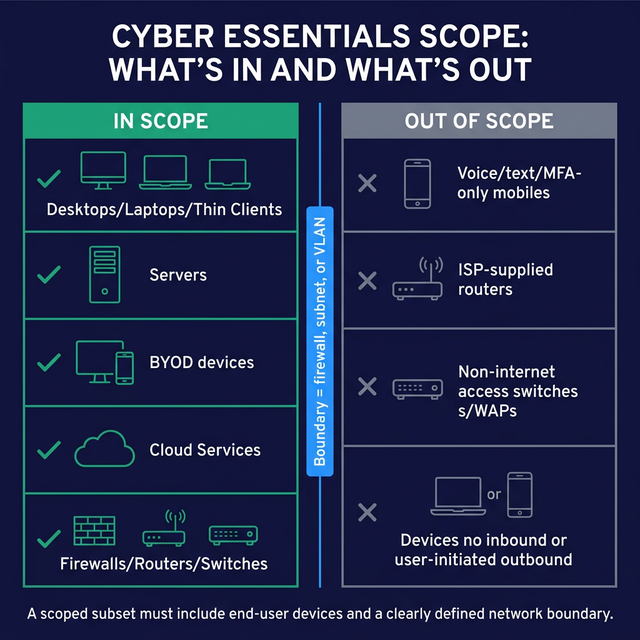
The Cyber Essentials scope is intended to apply to an entire organisation's set of assets, and most devices will fall under the defined scope.
| Device Type | In Scope | Conditions / Notes |
|---|---|---|
| Desktops, Laptops, Thin Clients, Virtual Desktops | Yes | If used to access organisation resources |
| Servers (Physical, Virtual, Hypervisors) | Yes | All server types |
| BYOD (Laptops, Desktops, Mobiles) | Yes | If used to access organisation resources or data including email or remote access |
| Cloud Services (Infrastructure as a Service (IaaS), Platform as a Service (PaaS), and Software as a Service (SaaS)) | Yes | All cloud-hosted services |
| Firewalls, Routers, Switches, Wireless Devices | Yes | If internet-accessible and routing traffic |
| Mobile Devices (voice/text/Multi-Factor Authentication (MFA) only) | No | Only if used solely for native voice, text or MFA - no access to org data |
| ISP Routers | No | Out of scope by default |
| Switches and Wireless not directly internet-accessible | No | Not directly internet-accessible |
| Devices with no untrusted inbound or user-initiated outbound connections | No | No connection path to or from the internet |
Within Cyber Essentials there are also options to only define a subset of your organisation within scope rather than the organisation as a whole.
When segmenting your organisation into sections which are in-scope and sections which are out-of-scope, both segments must share a clearly defined network boundary - for example, separated by a firewall, subnet, or Virtual Local Area Network (VLAN).
When defining a subset, the same scope definition requirements will apply to the segment of the organisation which is in scope and will always need to include some form of end user devices.
The Cyber Essentials assessment contains five key control areas:
- Access Controls
- Secure Configuration
- Updating Software
- Malware Protection
- Firewalls
What Are the Five Cyber Essentials Controls?
The following guidance reflects the Cyber Essentials Requirements for IT Infrastructure (Willow release, current as of 2024), published by IASME on behalf of NCSC.
| Control | Key Requirement | Primary Documentation Needed | Cyber Essentials Plus Additional Check |
|---|---|---|---|
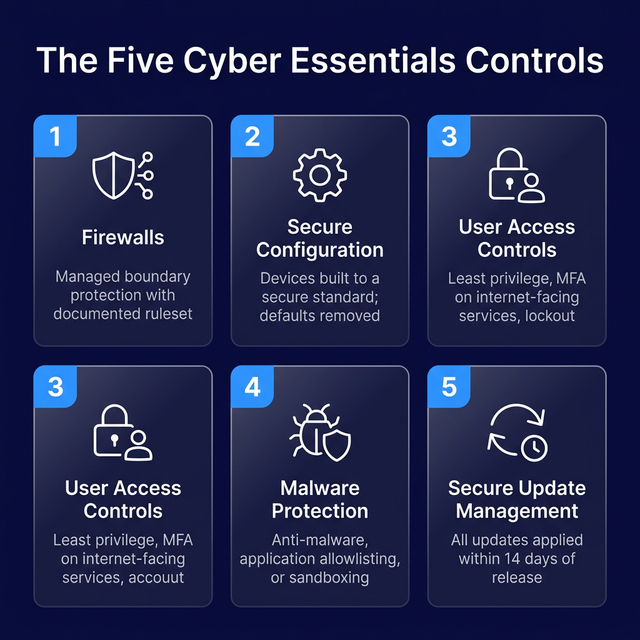
| Firewalls | Managed, configured gateway with documented ruleset | Firewall Rule Management, Asset Management, Patch Management Policy | External infrastructure assessment; firewall ruleset review |
| Secure Configuration | Devices built to a secure standard; defaults removed | Device Build Policy, Software Management | Build review; vulnerability assessment |
| User Access Controls | Least privilege, MFA on internet-facing services, account lockout | User Management Policy, Credential Management Policy | Password analysis; phishing assessment |
| Malware Protection | Anti-malware, application allowlisting, or application sandboxing | Device Build Policy, Software Management | Verification of anti-malware deployment and update status |
| Secure Update Management | All updates applied within 14 days of release | Patch Management Policy, Asset Management | Vulnerability scanning; patch verification against sampled devices |
Firewalls
Your organisation's firewall will likely act as your gateway device to the internet and provide your devices with a level of protection from being directly targeted by internet-borne attackers. The firewall should be carefully configured and managed, as a misconfiguration can inadvertently result in devices or services being directly accessible via the internet and an increased threat from attacks, such as Denial of Service, Brute Force Password Attacks and targeted attacks against known vulnerabilities in exposed services.
Regardless of whether your devices are protected by a network firewall or a software firewall, there should be a considered management strategy in place to ensure a set of consistent and key security controls are in place, including:
- Access to the firewall should be protected
- Default login accounts should be disabled or changed
- Vendor documentation should be reviewed to remove any insecure default settings
- Maintain a documented set of firewall rules with confirmed and approved reasons for each rule.
- Any services exposed through the firewall should have a documented business case for why they need to be accessible.
- Any changes to the set of firewall rules should be approved and records updated to reflect the changes.
- Conduct a Firewall Ruleset review and External Infrastructure assessment on a regular basis to ensure that the configuration, patching requirements and user accounts are all in line with expectations.
What documentation does firewall management require?
To manage organisation Firewalls in line with the Cyber Essentials requirements, the following documentation will apply if not already in place:
- Asset Management, to ensure that all devices in use by the organisation are logged.
- Device Build Policy, to ensure that the Secure Configuration requirements are initially applied
- User Management Policy, to ensure that accounts and permissions are correctly configured to access the Firewall.
- Credential Management Policy, to ensure that secure passwords are utilised to access the Firewall
- Patch Management Policy, to ensure that Firewalls are maintained with the latest available updates.
- Firewall Rule Management, to ensure that the creation, change and removal of Firewall rules is correctly managed and approved.
Common failure points: The most frequent firewall failure we see at assessment is the use of a consumer-grade or ISP-supplied router as the boundary firewall, without a reviewed or documented ruleset in place. Organisations often have open inbound rules that were created for a specific purpose and never reviewed or removed. A regular ruleset review - at minimum annually, and after any significant network change - is the single most effective step organisations can take ahead of assessment.
Secure Configuration
All devices which are in use within the organisation and under the Scope of Cyber Essentials will need to be configured to a secure standard. It is often the case that devices have a number of default settings in place which are not configured to the most secure standard available.
Software can be preinstalled on devices, which is not necessary for business use, and devices often have default accounts setup for initial access, often with default and known credentials in use.
For any device which is being utilised by the organisation, a standard build process should be adhered to, ensuring that default and insecure options are removed. Although the specifics for each device may vary, the following key principles should always be in place:
- Default login accounts should be disabled or changed
- Unnecessary software should be removed
- Maintain a documented set of software to be installed on devices
- Any software in use should have a documented business case for why it needs to be installed on devices
- Any changes/additions to this set of software should be approved and records updated to reflect changes
- Conduct a regular Vulnerability Assessment and Build Review of devices to ensure that secure configuration settings are applied as intended and no vulnerabilities or insecure settings are in place.
To manage the Secure Configuration of devices in line with the Cyber Essentials requirements, the following documentation will apply.
- Asset Management, to ensure that all devices in use by the organisation are logged.
- Software Management, to ensure that all software in use by the organisation is logged.
- Device Build Policy, to ensure that the Secure Configuration requirements are applied to each device
- User Management Policy, to ensure that accounts and permissions are correctly configured to access each device and service.
Common failure points: Default credentials not changed on network devices and unnecessary services left enabled are the two issues we encounter most frequently under this control. Organisations that have grown their device estate quickly - through acquisitions or rapid remote working rollouts - are especially susceptible, as devices can be deployed without ever being passed through a formal build process. A documented build standard, applied consistently before any device enters service, resolves most secure configuration failures before they reach assessment.
User Access Controls
For any account which is created, updated or removed, whether this is a user account, service account, or accounts provided to 3rd parties and contractors, a core set of security principles should be in place to reduce any potential for compromise.
Additionally, the permissions for each user account should be carefully considered with a principle of least privilege in place.
The following key security controls should be implemented for the management of all user accounts in use throughout the organisation:
- Only create, edit or remove accounts after a specific approval process has been followed
- Only assign the specific permissions which are necessary for any user account
- Administrator accounts should always be created as separate accounts, and never be a day-to-day usage account.
- Never setup single accounts for multiple users to share, always create unique accounts
- Maintain a documented list of user accounts and the assigned permissions
- MFA should be enabled wherever available, for login services that face the internet, particularly for cloud services this should always be in place. The Willow release of the Cyber Essentials Requirements for IT Infrastructure expanded MFA requirements to cover all internet-accessible services where password authentication is used - this is one of the most significant recent changes to the scheme.
- Ensure authentication is required to unlock, or access devices
- Enforce technical controls to enable secure password selection and educate and promote the selection of secure password choices for all of your users
- Ensure your accounts have a lockout policy in place to protect them from brute force password guessing attacks.
- Conduct a regular password analysis and phishing assessment against your users to ensure that users are suitably educated and adhering to the security guidelines as intended.
What documentation does user access control require?
To securely manage User Accounts in line with the Cyber Essentials requirements, the following documentation will apply.
- User Management Policy, to ensure that accounts and permissions are correctly configured to access each device and service.
- Credential Management Policy, to ensure that secure passwords are in place and users suitably educated on the importance of choosing secure passwords.
- Account Usage Guidelines, to ensure that users are educated on the importance of secure account usage.
- User Account Management, to ensure that accounts in use throughout the organisation are logged
Common failure points: The absence of MFA on cloud and internet-facing services is the most common reason organisations require remediation on this control - particularly for Microsoft 365, remote desktop services, and VPN portals. Excessive use of administrator accounts for day-to-day tasks, and shared credentials across multiple users, are close runners-up. The expanded MFA requirement in the Willow release means organisations that previously relied on carve-outs for certain services should review their position carefully before assessment.
Malware Protection
Ensuring Malware Protection solutions are in place for your devices helps to prevent a large percentage of common attacks.
The Cyber Essentials requirements define three methods of securing devices against Malware:
- Having Anti-Malware software installed on your devices, where you can conduct on-access file scanning and web-page scanning
- Limiting the installation of applications to an approved set, where users are limited from installing applications, and may only make use of applications from an approved list
- Implementing an Application Sandbox, where users may run applications within the sandbox, and the sandbox is unable to access organisation data, sensitive content and other devices.
For the secure setup and management of Malware Protection solutions in line with the Cyber Essentials requirements, the following documentation will apply.
- Device Build Policy, to ensure that the devices are initially setup with a method of Malware Protection in place
- Patch Management Policy, to ensure that all malware protection software is maintained with the latest available updates.
- Software Management, to ensure that all malware protection software in use by the organisation is logged, reviewed and kept up to date
Common failure points: Outdated or unlicensed anti-malware software is the most frequent issue we see - particularly on devices that have moved between users or been in service for several years without a formal review. Organisations must be able to demonstrate that real-time scanning is enabled and that definitions are current; simply having anti-malware software installed is not sufficient if it has not received updates. Where application allowlisting is the chosen method, the approved application list must be documented.
Secure Update Management
For any device which is being utilised by the organisation, a standard patch management process should be adhered to, ensuring that the latest available updates are applied. This may be applied through automated updates, patch management solutions or manual updates, but should always be applied within 14 days of patch release, as required by the Cyber Essentials Requirements for IT Infrastructure (Willow release, IASME/NCSC). Applying updates promptly is especially critical for remotely exploitable vulnerabilities - unpatched operating systems and network appliances are among the most commonly observed attack vectors in active exploitation campaigns.
- Configure automated updates wherever available for both operating systems and software
- Deploy patch management solutions where possible to log devices, installed software, and automatically deploy updates
- Maintain a documented list of all devices in use within the organisation, including the installed operating system and software.
- Maintain a regular review process for a continually changing sample of devices and software, to ensure that updates are being applied as intended and no single device is being overlooked.
- Conduct regular vulnerability scanning of devices to automate checks against updates being applied and ensure that no known vulnerabilities impact your systems.
To manage the secure patch management of devices in line with the Cyber Essentials requirements, the following documentation will apply.
- Patch Management Policy, to ensure that all devices are maintained with the latest available updates.
- Device Build Policy, to ensure that the devices are initially setup to a secure standard and receive ongoing and regular reviews
- Software Management, to ensure that all software in use by the organisation are logged, reviewed and kept up to date
- Asset Management, to ensure that all devices in use by the organisation are logged, reviewed and kept up to date
Common failure points: Organisations running unsupported operating system versions or applications past their vendor end-of-life date are the most consistent source of failure on this control - particularly on end-user devices and legacy network appliances where updating can feel disruptive. Automated update tools help, but they require a documented review process alongside them to confirm that updates are being applied as intended across the full device estate, not just the devices that are easiest to patch.
Is Your Organisation Ready for Cyber Essentials Certification?
Cyber Essentials certification is achievable for most organisations, regardless of size or technical maturity. The five controls - firewalls, secure configuration, user access controls, malware protection, and secure update management - are baseline requirements that apply to every device and user account within your defined scope. The most common barrier is not complexity but documentation: organisations that have policies and processes in place, even informally, often need only to formalise what already exists. For tailored guidance, contact Precursor Security.
Think you're ready to certify against Cyber Essentials? Preparation can help reduce costs and improve your chances of passing successfully the first time. Work through our free Cyber Essentials Plus Checklist to get a full gap analysis report and expert recommendations - making sure your organisation meets all of the Cyber Essentials requirements and Cyber Essentials Plus requirements ahead of certification.
Frequently Asked Questions
What is the scope of Cyber Essentials?
The Cyber Essentials scope covers all devices within an organisation's IT estate that access organisation resources or data, including desktops, laptops, servers, cloud services, BYOD devices, and internet-facing network devices. Organisations may define a subset of their estate as the in-scope boundary, provided it is separated by a clearly defined network boundary such as a firewall or VLAN.
What are the five Cyber Essentials controls?
The five Cyber Essentials controls are: Firewalls (managing boundary protection and ruleset documentation), Secure Configuration (removing defaults and unnecessary software), User Access Controls (least privilege, MFA, and account lockout policies), Malware Protection (anti-malware, application allowlisting, or sandboxing), and Secure Update Management (applying all updates within 14 days of release). Together they form the baseline set of technical security measures required for certification.
What is Cyber Essentials Plus?
Cyber Essentials Plus is the audited tier of the scheme. Where Cyber Essentials is a self-assessed questionnaire, Cyber Essentials Plus involves a hands-on technical verification by a Certification Body - including external infrastructure assessment, build reviews, vulnerability scanning, and password and phishing assessments. Achieving Cyber Essentials Plus provides a higher level of assurance to customers and supply chain partners.
How long does it take to prepare for Cyber Essentials?
Preparation timelines vary significantly by organisation. Organisations with informal policies already in place typically need four to eight weeks to document existing controls and close any remaining gaps. Organisations starting from scratch - particularly those with a complex or legacy device estate - should allow three to six months. Using a structured gap analysis tool such as the Cyber Essentials Plus Checklist at the outset will give you a clear view of where effort is needed before committing to a certification date.
Does Cyber Essentials cover cloud services?
Yes. Cloud services - including Infrastructure as a Service (IaaS), Platform as a Service (PaaS), and Software as a Service (SaaS) - are in scope for Cyber Essentials. The Willow release of the Cyber Essentials Requirements for IT Infrastructure introduced clarification on what constitutes a managed cloud service for scoping purposes. Responsibility for the five controls is shared between the organisation and the cloud provider depending on the service model, and the assessment questionnaire requires organisations to confirm which controls have been applied to their cloud-hosted services.